
Harnessing AI Magic: A Guide to Merging Creativity with Technology for Stunning Visuals
- aymane yousfi
- Jan 12
- 4 min read

Artificial intelligence tools like ChatGPT and Midjourney have transformed how creatives approach visual storytelling. Yet, the true power of these technologies emerges only when combined with human insight and artistic judgment. This post explores how to craft high-end product capsules and moody, realistic portraits by guiding AI with a human eye for detail, lighting, and emotion.

The Synergy: Why AI Needs a Human Eye for Lighting and Composition
AI can generate images quickly and with impressive detail, but it lacks the nuanced understanding of light, shadow, and composition that humans develop through experience. For example, Midjourney can produce a visually striking image, but without human direction, it might miss subtle cues that make a product or portrait feel authentic and compelling.

Humans excel at:
Judging light direction and quality: Knowing when to use soft diffused light versus harsh shadows.
Balancing composition: Placing elements to guide the viewer’s eye naturally.
Interpreting emotion and mood: Adding depth through subtle cues like facial expression or color tone.
AI acts as a powerful assistant, generating options and variations rapidly. The human artist then selects, refines, and adjusts these outputs to align with a creative vision. This collaboration produces visuals that feel both innovative and deeply human.

Mastering the Product Capsule: A Step-by-Step Guide to Generating 3D Glass-Capsule Visuals for Brands
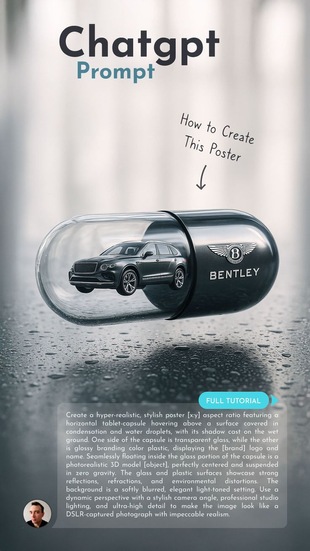
Creating a product capsule image that rivals brands like Bentley or Nike requires careful planning and precise prompts. Here’s a practical approach using Midjourney:
Define the product and brand identity clearly
Specify the product type, materials, and brand style. For example: “luxury sports shoe with carbon fiber details, sleek and modern.”
2 .Specify the capsule environment
Describe the glass capsule as transparent, reflective, and minimalistic. Include details like “3D glass orb with subtle reflections and refractions.”
3. Control lighting for mood and clarity
Use keywords such as “studio lighting,” “soft shadows,” and “high contrast” to create depth and highlight product features.
4 .Add camera details for realism
Mention lens type and angle, e.g., “85mm lens, eye-level view, shallow depth of field” to mimic professional photography.
5 .Iterate and refine
Generate multiple versions, then adjust prompts based on what works best. For example, increase “glass reflectivity” or add “ambient glow” to enhance the capsule’s presence.
6 .Post-process if needed
Use editing software to tweak highlights, shadows, or color balance for a polished finish.
This method produces images that feel tangible and luxurious, perfect for high-end product presentations.



The Soul of Portraits: How to Describe Human Emotions and Cinematic Lighting to Get Realistic Faces
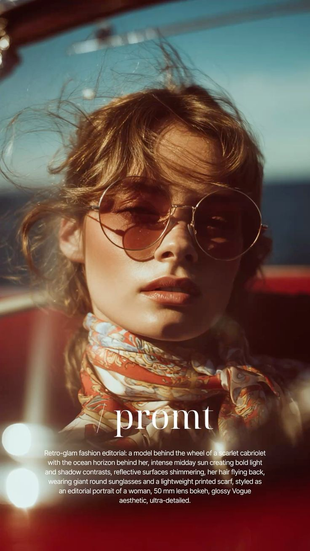
Portraits created with AI can sometimes feel flat or artificial without careful prompting. To capture the complexity of human emotion and the drama of cinematic lighting, focus on these elements:
Emotion description
Use precise emotional words like “melancholy,” “intense focus,” or “quiet confidence.” Combine these with physical cues such as “slight furrowed brow” or “soft gaze.”
Lighting style
Chiaroscuro lighting, which uses strong contrasts between light and dark, adds depth and mood. Describe it as “dramatic chiaroscuro with deep shadows and bright highlights.”
Facial details
Request “fine skin texture,” “natural pores,” and “subtle wrinkles” to avoid overly smooth or plastic-like faces.
Camera and lens
Specify “85mm lens” for flattering portrait compression and “studio lighting” for controlled illumination.
Example prompt snippet:
“Portrait of a woman with quiet confidence, dramatic chiaroscuro lighting, soft gaze, fine skin texture, 85mm lens, studio lighting.”
This approach helps Midjourney generate portraits that feel alive and emotionally resonant.



Expert Refinement: Using Specific Keywords Like Hyper-realistic, 85mm Lens, and Studio Lighting
Keywords shape the AI’s output quality and style. Here’s how to use them effectively:
Hyper-realistic
This keyword pushes the AI to add intricate details and textures, making images look almost photographic.
85mm lens
Refers to a classic portrait lens that compresses features pleasingly and creates a shallow depth of field, isolating the subject.
Studio lighting
Implies controlled, often soft and directional light sources that highlight form and texture without harsh shadows.
Combine these with modifiers like “high resolution,” “sharp focus,” and “soft shadows” to enhance realism.
For example, a product prompt might read:
“Luxury watch inside a 3D glass capsule, hyper-realistic, 85mm lens, studio lighting, sharp focus, soft shadows.”
For portraits:
“Moody portrait of an elderly man, hyper-realistic skin texture, chiaroscuro lighting, 85mm lens, studio lighting.”
Using these keywords consistently helps maintain a professional and polished look across AI-generated visuals.


Bonus: Exclusive Signature Prompts by Yousfi Tech
To help you get started, here are three high-performance prompt templates I’ve developed. You can copy and customize these to achieve the same professional results shown in this guide.
The Luxury Capsule Prompt:
"Product photo, [Your Brand Name] logo on a sleek [Color] and transparent glass horizontal capsule, floating in a minimalist studio. High-end lighting, 85mm lens, sharp focus on textures, hyper-realistic, 8k resolution."
The Cinematic Human Portrait Prompt:
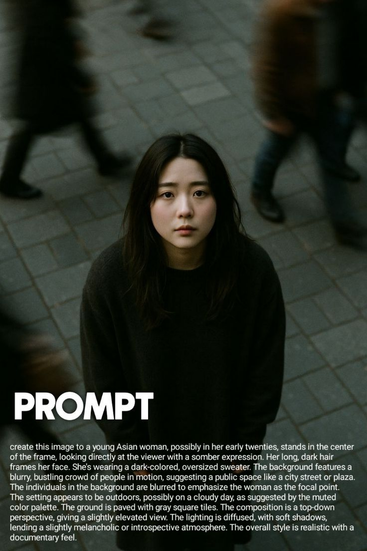
The Cinematic Human Portrait Prompt: A moody, close-up portrait of a [Description of Person], deep introspective expression, chiaroscuro studio lighting, visible skin pores, fine hair detail, shot on 85mm, cinematic atmosphere, photorealistic."
The Creative Packaging Prompt:
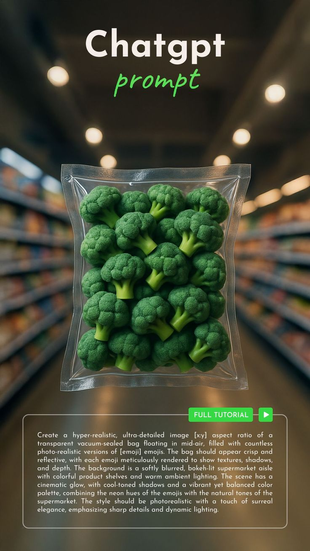
"Hyper-realistic CGI of a transparent vacuum-sealed bag floating in mid-air, filled with [Object/Fruit], neon accents, soft studio illumination, vibrant colors, ultra-detailed textures, professional product photography."
Viral AI Trends: Bringing Global Art Styles to Your Photos


Comments